Skip Navigation
Skip Navigation

TSplus Advanced Security – Complete Windows Server RDP Protection

Enterprise-grade TSplus RDP protection designed to secure Windows Server environments against brute force attacks, ransomware threats, and unauthorized access.
Strengthen your Windows Server RDP security with advanced IP filtering, geo blocking, and real-time RDP brute force protection.

Why Your RDP Server Needs Advanced Protection

If your Windows Server is exposed to the internet, it is already under attack. Automated bots constantly scan open RDP ports looking for weak passwords and unprotected login endpoints. Without proper Windows Server RDP security, your infrastructure is vulnerable to brute force attacks, ransomware, and unauthorized access.
Traditional antivirus is not enough. You need a dedicated TSplus security solution built specifically for Remote Desktop environments.
Expert Data Center Design and Build

Key Risk Points

Constant RDP Brute Force Attempts

Thousands of automated login attempts target exposed RDP servers daily. Without strong RDP brute force protection, access can be compromised.

Ransomware Targeting Remote Desktop

RDP is a primary entry point for ransomware attacks. You must protect Remote Desktop from ransomware before it disrupts your operations.

Unauthorized Global Access

Open RDP access allows login attempts from anywhere in the world. Without Geo IP blocking RDP and proper IP filtering for Windows Server, your attack surface remains wide open.

Lack of Specialized

Standard firewall rules are not enough. You need advanced RDP firewall software built to monitor login behavior and block suspicious IP activity in real time.

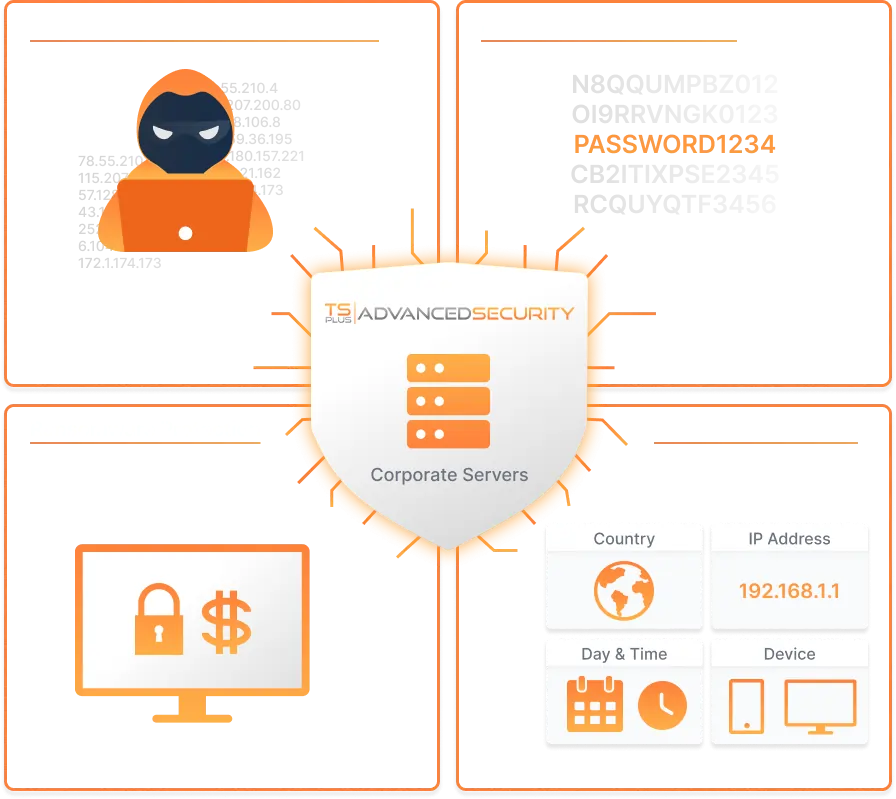
TSplus Advanced Security delivers specialized TSplus RDP protection and complete Remote Desktop cybersecurity. It combines brute force defense, anti ransomware for Windows Server, IP filtering, and geo blocking into one centralized security platform.

This is not just software. It is structured TSplus server hardening designed to secure Windows remote access environments.

Advanced Security Features Built for Windows Server RDP Protection

Advanced RDP Brute Force Protection

Advanced RDP Brute Force Protection

Automated bots continuously attempt password guessing on exposed RDP ports. This module delivers enterprise-level RDP brute force protection by:

  • Automatically blocking repeated failed login attempts
  • Real-time suspicious IP detection
  • Dynamic blacklisting of malicious sources
  • Customizable security thresholds

This ensures strong RDP attack prevention and prevents unauthorized login access.

Anti Ransomware for Windows Server

Anti Ransomware for Windows Server

RDP servers are prime ransomware targets. TSplus Advanced Security includes built-in anti-ransomware for Windows Server that:

  • Detects abnormal encryption behaviour
  • Blocks unknown malicious processes
  • Protects shared folders and mapped drives
  • Stops encryption-based attacks in real time

This helps you protect Remote Desktop from ransomware before business disruption occurs.

Geo IP Blocking RDP
Geo IP Blocking RDP

Geo IP Blocking RDP

Reduce your global exposure instantly with Geo IP blocking RDP.

  • Allow access only from approved countries
  • Block high-risk regions
  • Minimize international attack attempts
  • Strengthen secure Windows remote access policies

Geo filtering significantly enhances Remote Desktop cybersecurity.

IP Filtering for Windows Server

IP Filtering for Windows Server

Take full control over who can access your server.

  • Whitelist trusted IP addresses
  • Manually block suspicious IPs
  • Automated blacklist updates
  • Detailed connection logging

This advanced IP filtering for Windows Server ensures only authorized users can connect.

TSplus Firewall Protection Layer

TSplus Firewall Protection Layer

Unlike generic firewall tools, TSplus firewall protection is optimized for RDP traffic.

  • Monitors login behaviour
  • Detects suspicious connection patterns
  • Blocks abnormal activity
  • Acts as advanced RDP firewall software

This provides focused TSplus RDP protection without complex hardware configuration.

Working Hours Access Control

Working Hours Access Control

Limit remote access to defined business hours.

  • Block after-hours login attempts
  • Reduce overnight attack risks
  • Improve operational security posture

This strengthens overall Secure Windows remote access strategy.

Pricing & Packages

Essentials Edition

One-time Purchase

₹ 16,330/ server

Ultimate Edition

One-time Purchase

₹ 16,330/ server

Our Data Center Design and Build Process

Strategy

We leverage our technical expertise to strategize and plan your data center project, ensuring it meets regional and international standards for efficiency and reliability.

Planning

Our systematic approach to data center design includes detailed planning and budgeting to align with your business goals and infrastructure requirements.

Development

We specialize in developing data centers that optimize your IT resources, enhance security, and support future growth while improving operational efficiency.

Compliance Check

Every aspect of the data center design is rigorously checked to ensure compliance with industry standards & regulatory requirements, providing you with peace of mind.

By following this comprehensive process, Tech Guru IT Solutions delivers Data Center Architecture that is efficient, scalable, and future-proof, tailored to meet your specific business needs.

Secure Your Windows Server Before the Next RDP Attack

Brute force bots scan exposed servers 24/7. Ransomware does not give warnings. Strengthen your Windows Server RDP security with TSplus Advanced Security today.

Deploy advanced RDP brute force protection, Geo IP blocking, and anti ransomware for Windows Server in minutes.
Tech Guru IT Solutions ensures complete TSplus server hardening and secure Windows remote access without complex firewall upgrades.

start your project now

contact us today

Everything you need in an IT Service Desk Software.

care@techguru.co.in

We reply within 24 hours

Have any questions?​

Working hours​

Mon-Sat, 10am until 6pm

Core Values

Integrity | Customer Delight | Ethical & Compliant | Empowerment |
Honesty & Trust | Transparency | Fairness | Passion to Succeed |
Deliver on Promises | Ownership

Customized IT Solutions for Your Unique Needs: Reach Out Today!

New form for whole website